How to Submit an Architectural Submittal for a Spec Home?
How to Submit an Architectural Submittal for a Spec Home
When a user needs to Add a Spec Home in The XO, the architectural submittal can be completed from the Add a Spec form. Once the submittal is completed it is automatically applied to the architectural approvals page. This article will display a walkthrough on the architectural submittal for a Spec Home from the Add a Spec Home form.
Submitting an Architectural Submittal for a Spec Home
Step 1
Locate the homesite and select the homesite card to proceed.
Step 1
Locate the homesite and select the homesite card to proceed.
Step 2
Once selected, another screen will pop up. Here is where the Add a Spec button will appear, highlighted in the RED box below. Click the button to begin submitting the architectural submittal for the Spec Home.
Step 2
Once selected, another screen will pop up. Here is where the Add a Spec button will appear, highlighted in the RED box below. Click the button to begin submitting the architectural submittal for the Spec Home.
Step 3
The Spec Home form is where information regarding the home can be entered. There are four areas to be completed to complete the form. After necessary fields are completed, click Next Step in the green box in the lower right-hand corner of the form to continue to the next area.
Step 3
The Spec Home form is where information regarding the home can be entered. There are four areas to be completed to complete the form. After necessary fields are completed, click Next Step in the green box in the lower right-hand corner of the form to continue to the next area.
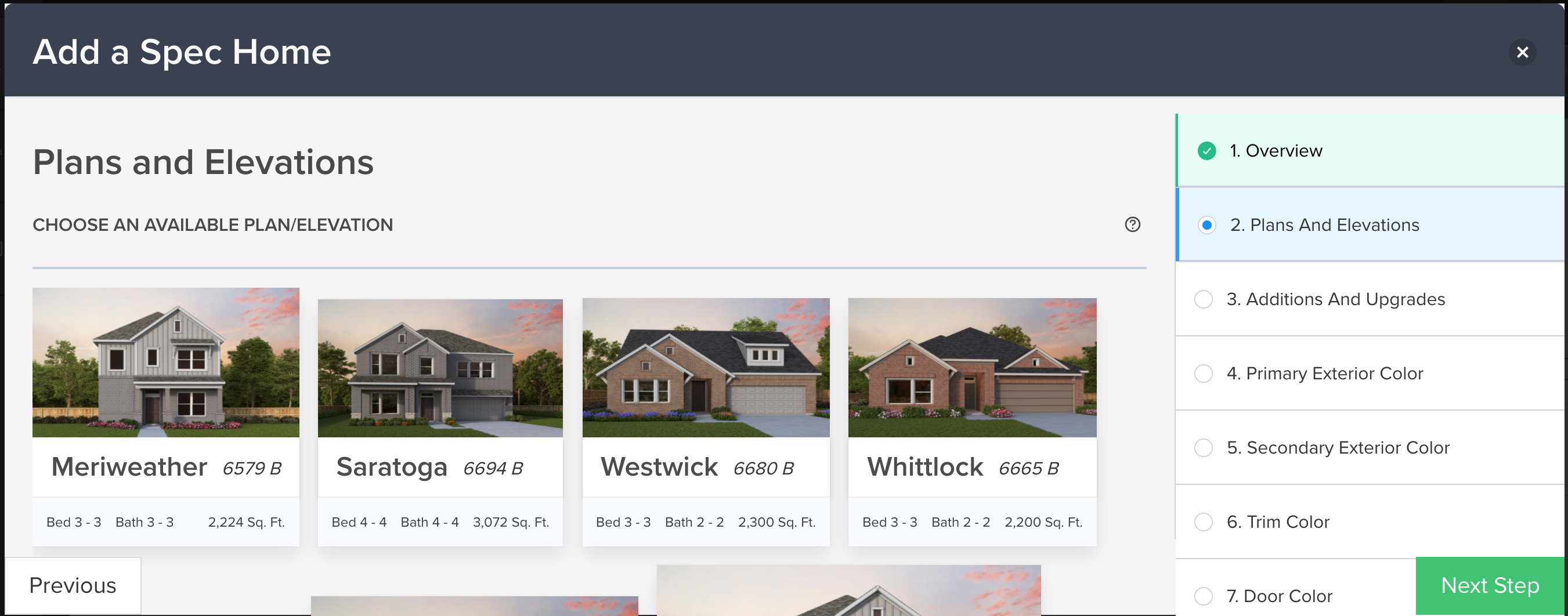
Step 4The Plans and Elevations area is where the XO anti-monotony is applied. Various options will or will not be available based on the community's design guidelines and the Master Plans that have been approved. Notice once a particular Plan/Elevation combination is selected the area highlights in blue. Once the appropriate plan and elevation are selected, click on Next Step in the green box below in the lower right-hand corner of the form to continue.
Step 4
The Plans and Elevations area is where the XO anti-monotony is applied. Various options will or will not be available based on the community's design guidelines and the Master Plans that have been approved. Notice once a particular Plan/Elevation combination is selected the area highlights in blue. Once the appropriate plan and elevation are selected, click on Next Step in the green box below in the lower right-hand corner of the form to continue.
Step 5
The next area is Additions/Upgrades. Here users can make any changes necessary in this section. If no changes are necessary, click on Next Step in the green box in the lower right-hand corner.
Step 6
The next area is Color Submissions. If necessary, the following color choices (Primary and Secondary Exterior Colors, Trim Color, Door Color, and Roof Color) will need to be selected and corrected. Please update these choices as necessary based on the anti-monotony rules within the community. To complete each area of the color options, click Next Step in the green box located in the lower right-hand corner of the form to continue.
Step 7
Be sure to include a complete set of building plans and other necessary documents requested for the Spec Home. To complete this section, click on Next Step in the green box located in the lower right-hand corner of the form.
Step 7
Be sure to include a complete set of building plans and other necessary documents requested for the Spec Home. To complete this section, click on Next Step in the green box located in the lower right-hand corner of the form.
Step 8
The XO will create a summary of the architectural submittal. If additional changes are needed, click in the area listed on the right side of the form in green with the checkmark. If completed, click Submit in the lower right-hand corner of the form. The developer will receive a notification stating an architectural submittal has been submitted and is ready for review.
Related Articles
Submitting an Architectural Submittal for a Spec Home
How to Submit an Architectural Submittal for a Spec Home When a user needs to Add a Spec Home in The XO, the architectural submittal can be completed from the Add a Spec form. Once the submittal is completed it is automatically applied to the ...Adding a Spec Home
How to Add a Spec Home in The XO platform In the XO, users can easily walk through the process of adding a spec home to the community. Adding a Spec Home Step 1 First, locate the left side panel and click on the Lot & Home Sales tab which provides ...Adding a Contract to a Spec Home
How to Add a Contract to a Spec Home In the XO, once the Add a Spec Home form is completed and the architectural submittal has been approved by the developer, a contract can be added to the Spec Home. Adding a Contract to a Spec Home Step 1 Below is ...What To Do If My Architectural Submittal Is Denied?
If the architectural submittal is denied for a home under contract or a spec, the request will need to resubmit through the XO. Any feedback from the developer can be accessed within the existing submittal to understand why the submittal was denied. ...How to Add a Spec Home?
How to Add a Spec Home in The XO platform In the XO, users can easily walk through the process of adding a spec home to the community. Adding a Spec Home Step 1 First, locate the left side panel and click on the Lot & Home Sales tab which provides ...